Change your voice in recordings
Tap record and talk, or upload an audio file. The app converts your voice and keeps your words, timing, and emotion.

Voice changer app
Voices AI is a voice changer and voice modifier app for iPhone and Android that turns your recordings into AI voices. Tap record or upload an audio or video file, pick a voice, and get the same words back in a new voice: a movie character, a parody of someone famous, an anime hero, or a clean narrator for your videos.
Try it free in your browser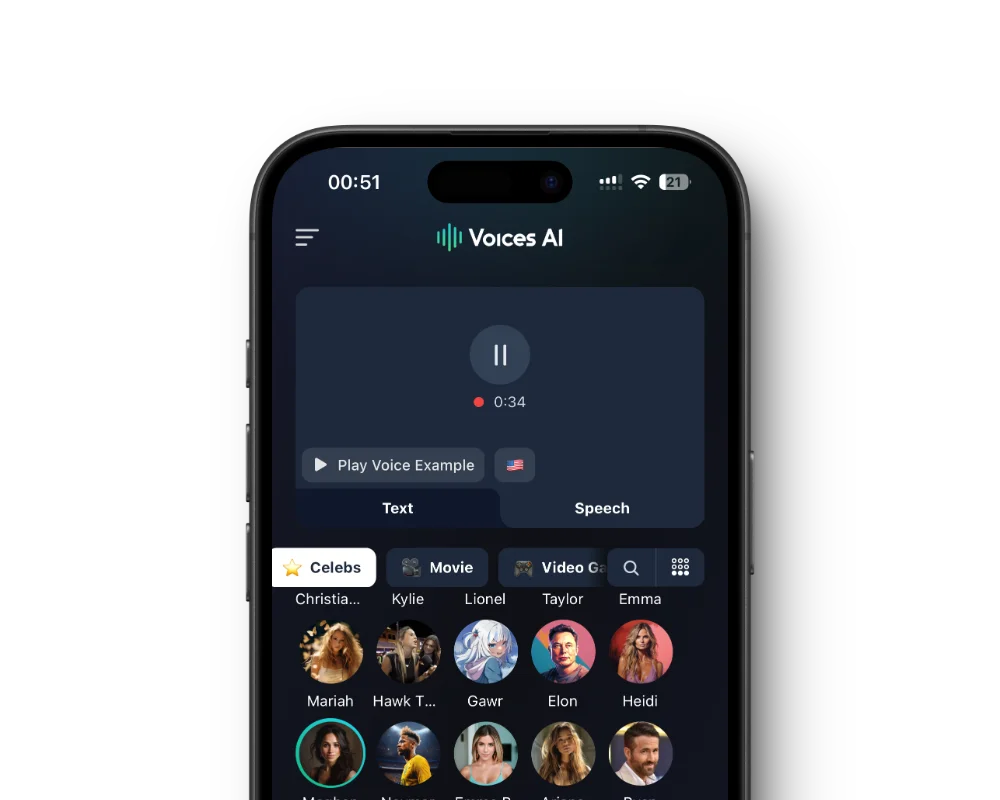
Tap a voice to hear its sample. Every voice in the app works with the voice changer, so you can record once and try several.
Tap record and talk, or upload an audio file. The app converts your voice and keeps your words, timing, and emotion.
Pick a video from your library or upload a file up to 60 minutes, and get it back with the new voice.
Use text to speech to make any voice say what you type, in dozens of languages.
Record a short sample of your voice and use your clone like any other voice in the app.
Install the free app from the App Store or Google Play.
Choose Record to talk into your phone, or File to upload audio or a video.
Tap a voice to preview it, then select it.
Play the result, then save it or share it to TikTok, Instagram, WhatsApp, or anywhere else.
Most people use a voice changer app for short videos: a reaction in a famous voice, a skit where you play every character, or a story narrated in the TikTok voice. Record the line, convert it, and drop the audio into your video editor, or convert the whole video in the app.
It works for voice messages too. Record a birthday greeting as a cartoon character or a prank message from a horror villain, convert it, and send the audio on WhatsApp, Telegram, or iMessage.
The voice changer follows your recording, so the input matters. Record in a quiet room, hold the phone a hand-width from your mouth, and speak clearly. One person at a time works best, and heavy background music gets in the way of the conversion.
Act the part. The AI keeps your pacing, pauses, and emotion, so if you want an excited announcer or a menacing villain, perform it that way. If a recording is noisy, run it through Enhance in the app first to remove the background noise.
The app changes the voice in recordings and videos. It does not change your voice live during phone calls or FaceTime.
Celebrity and character voices are AI parodies. Label clips as AI-made when you post them, and never use a voice to deceive people, impersonate someone to get money or information, or harass anyone.
Voices AI is free to download on iPhone and Android, and you can preview every voice before you start. Changing voices uses the credits or subscription in your account, so check the app for current plans.
Yes. Voices AI is on the App Store for iPhone and on Google Play for Android. You can also use the voice changer in your browser with Voices AI Studio.
Yes. Pick a video from your library or upload an audio or video file up to 60 minutes. Clear speech from one person gives the best result.
No. The app works on recordings and videos, not live calls. For real-time voice changing on a computer, use Voices AI Live for Windows and Mac.
Yes. Clone your voice in the app from a short recording, then use it like any other voice.
Every voice in the app works with the voice changer, from narrators and professional voices to movie, game, and anime characters. Character and celebrity voices are AI parodies.
Character voices are AI-generated parodies. They are not affiliated with or endorsed by their rights holders.
Generate Voiceovers & songs with AI
Change your voice in recordings and videos, make any voice say what you type, and clone your own voice.


